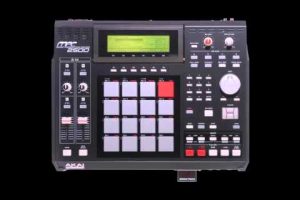
Making beats has never been more accessible than it is today. Whether you are a bedroom producer just discovering the craft or an experienced musician looking to sketch ideas quickly without spending a dime, free beat makers have transformed the music production landscape entirely. The days when you needed a massive budget and expensive studio equipment to create quality instrumentals are long gone. Today, powerful digital audio workstations, virtual instruments, and beat-making platforms offer professional-grade tools at zero cost. This comprehensive guide dives deep into the best free beat-making solutions available right now, what features matter most, and how to choose the right tool for your skill level and creative vision.
What Are Free Beat Makers and Why They Matter
A free beat maker refers to any software application, digital audio workstation, or web-based platform that allows music producers to create, arrange, and mix beats without paying licensing fees or subscription costs. These tools range from full-featured DAWs to streamlined beat-making apps designed for quick workflow. The rise of free beat-making software has democratized music production, enabling aspiring artists from every corner of the world to compete with professionals using expensive equipment.
For many producers, the journey begins with curiosity and a beat-making tool that costs nothing. Free platforms remove financial barriers, letting users experiment with drum patterns, melodies, basslines, and samples until they develop a signature sound. The best free beat maker software packages include built-in virtual instruments, effects processors, and sample libraries that rival paid alternatives in quality and versatility.
Top Free Beat Making Software for Producers
Not all free beat-making tools are created equal. Some offer deep, professional-grade features, while others focus on simplicity and speed. Understanding the differences helps you pick the right platform for your needs.
Best Free DAWs for Beat Making
Digital audio workstations form the backbone of modern beat production. These applications provide multi-track recording, MIDI sequencing, audio editing, mixing, and mastering capabilities in a single environment.
- GarageBand — Apple’s free DAW comes pre-installed on Mac computers and iOS devices. It features a massive library of virtual instruments, loops, and presets that make beat creation intuitive and fun.
- Cakewalk by BandLab — A fully featured Windows DAW that was once a premium product. It supports VST plugins, advanced MIDI editing, and professional mixing tools entirely for free.
- Tracktion Waveform Free — A capable DAW with unlimited tracks, real-time effects, and a modern interface designed for electronic music and hip-hop production.
- LMMS — An open-source beat maker that mimics the workflow of FL Studio. It is cross-platform and supports MIDI instruments, samples, and built-in synthesizers.
Browser-Based Free Beat Makers

Web-based beat makers eliminate installation requirements entirely, letting you create beats directly in your browser. These platforms are ideal for producers who want instant access without downloading large software packages.
- Soundtrap — Owned by Spotify, Soundtrap offers collaborative beat-making in the cloud with built-in loops, samples, and virtual instruments.
- BandLab — A comprehensive free platform that combines cloud-based DAW functionality with a social community for sharing beats and collaborating with other producers.
- Soundation — A browser-based studio with real-time effects, loop libraries, and a timeline-based arrangement workflow suited for quick beat creation.
Features to Look For in a Free Beat Maker
Choosing the right free beat-making tool requires understanding which features will elevate your production quality and workflow efficiency.
- Sample Library Quality — The best free beat makers come loaded with high-quality drum kits, one-shots, loops, and synth presets that sound polished out of the box.
- MIDI Support and Virtual Instruments — Look for platforms that support VST or AU plugin formats and include built-in synthesizers, samplers, and drum machines.
- Effects Processing — Reverb, delay, compression, EQ, and saturation plugins are essential for giving beats a professional mix quality without leaving the application.
- Export Options — Ensure the software allows you to export beats in high-quality audio formats like WAV or FLAC without watermarking or track limitations.
- Workflow and Interface — A clean, intuitive interface reduces the learning curve and keeps you focused on creativity rather than navigating confusing menus.
- Collaboration Features — Cloud-based sharing, project importing, and real-time collaboration tools help producers grow together and receive feedback on their beats.
Free Beat Makers for Beginners vs. Advanced Producers

The ideal free beat-making tool depends heavily on where you stand in your production journey. Beginners need intuitive interfaces and guided workflows, while advanced producers require deep customization and professional-grade mixing capabilities.
Getting Started: Best Options for Beginners
If you have never produced a beat before, start with platforms that prioritize ease of use and visual feedback. GarageBand remains the gold standard for beginners on Apple devices, offering drag-and-drop loops, built-in tutorials, and a massive sound library that makes experimentation effortless. BandLab is another excellent starting point because it works on any device through a browser or mobile app, requiring zero setup.
For producers who want to learn a traditional DAW workflow, LMMS provides a free, open-source alternative to FL Studio that teaches essential concepts like pattern-based sequencing, mixer routing, and effect chaining. These beginner-friendly platforms build foundational skills that translate directly to professional-grade software later.
Leveling Up: Advanced Tools for Experienced Producers
Intermediate and advanced producers need free beat makers that support third-party plugins, offer advanced MIDI editing, and provide detailed automation capabilities. Cakewalk by BandLab stands out in this category with its professional feature set, including unlimited audio and MIDI tracks, built-in mastering tools, and full VST support. Tracktion Waveform Free also excels for experienced users with its modern workflow and powerful real-time audio processing engine.
Comparison Table: Popular Free Beat Makers
| Software | Platform | Best For | Key Strength | VST Support |
| GarageBand | Mac, iOS | Beginners | Intuitive interface and loops | AU plugins only |
| Cakewalk by BandLab | Windows | Advanced producers | Full professional DAW features | Yes (VST/AU) |
| LMMS | Windows, Mac, Linux | Beginners to Intermediate | FL Studio-like workflow | Limited |
| Tracktion Waveform Free | Windows, Mac, Linux | Intermediate to Advanced | Unlimited tracks and modern UI | Yes |
| BandLab | Web, Mobile | Beginners, Collaboration | Cloud-based and social features | No |
| Soundtrap | Web, Mobile | Beginners, Collaboration | Spotify integration and sharing | No |
Expert Tips for Making Professional Beats for Free
Using a free beat maker does not mean compromising on quality. Experienced producers follow specific strategies to achieve polished, radio-ready results without spending money on software.
- Invest time in learning your chosen platform deeply. Mastering one free DAW produces better results than casually using five different tools. Watch tutorials, experiment with every feature, and build muscle memory for your workflow.
- Source high-quality free samples and drum kits. Websites like Splice, Cymatics, and producers’ own sample packs offer free, professional-grade sounds that elevate any beat beyond the default library sounds.
- Focus on arrangement and dynamics. A well-structured beat with tension, drops, and variation sounds more professional than a complex beat with poor arrangement, regardless of the software used.
- Use free VST plugins to expand your sound palette. Tools like Vital Synth, TAL-NoiseMaker, and SPAN (for metering) add professional capabilities to any free beat maker without cost.
- Mix with your ears, not your eyes. Train yourself to identify frequency clashes, stereo imaging issues, and dynamic imbalances. Free tools are only as good as the producer’s ear and understanding of mixing principles.
- Export frequently and seek feedback. Sharing your beats with other producers or online communities provides perspective that helps you identify areas for improvement and accelerate your growth.
Frequently Asked Questions
What is the best free beat maker for beginners in 2024?
GarageBand remains the top recommendation for beginners on Apple devices due to its intuitive interface, built-in loops, and seamless integration with macOS and iOS. For Windows users or those who prefer browser-based tools, BandLab offers an equally accessible entry point with collaborative features and a zero-setup experience. Both platforms teach foundational production skills without any financial investment.
Can you make professional-quality beats with free software?
Absolutely. Professional-quality beats depend on the producer’s skill, creative vision, and understanding of arrangement, sound design, and mixing — not the price tag of the software. Many chart-topping instrumentals have been created entirely with free DAWs and plugins. Tools like Cakewalk by BandLab and Tracktion Waveform Free offer professional-grade feature sets that rival expensive paid alternatives when used skillfully.
Are there any limitations when using a free beat maker?
Some free beat makers impose limitations on track counts, export quality, or plugin support. For example, LMMS has limited VST support compared to full-featured DAWs, and some browser-based platforms watermark exports or restrict audio file formats. However, the best free options like Cakewalk and GarageBand impose virtually no creative limitations, making them viable for professional work.
Which free beat maker works best for hip-hop production?
FL Studio Free alternatives like LMMS and Cakewalk by BandLab excel at hip-hop production due to their step sequencer workflows, pattern-based arrangement, and support for chopping and layering samples. Producers who want a mobile-friendly option can use BandLab on iOS or Android devices to sketch ideas and create full beats on the go with touchscreen-friendly interfaces optimized for drum programming and melody writing.
Is BandLab completely free to use for beat making?
Yes, BandLab is entirely free with no hidden paywalls, premium tiers that lock essential features, or export limitations. The platform generates revenue through optional hardware sales and partnerships rather than restricting core functionality. Users get access to the full DAW, unlimited projects, cloud storage, collaboration tools, and a vast community library at no cost whatsoever.
Conclusion
The landscape of free beat makers has never been richer or more capable. From GarageBand’s beginner-friendly interface to Cakewalk’s professional-grade feature set, producers at every skill level now have access to tools that were once reserved for those willing to invest hundreds or thousands of dollars. The key is choosing a platform that aligns with your workflow, committing to learning its features deeply, and supplementing your software with high-quality free samples and plugins. With dedication, creativity, and the right free tools, there is absolutely no ceiling on the quality of beats you can produce today. Start experimenting, build your sound, and let the music speak for itself.