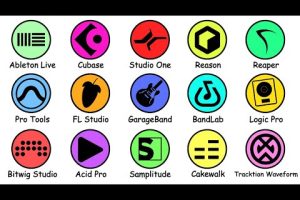
Choosing the right software for music production can make or break your creative workflow. Whether you are laying down your first beat in a bedroom studio or producing chart-topping tracks in a professional setup, the digital audio workstation (DAW) you select shapes every part of your sound. The market is flooded with options, from free music production software to premium-tier platforms packed with advanced features. This guide breaks down the best DAWs across every skill level, compares their strengths side by side, and gives you actionable advice to find the perfect fit for your music production needs.
What to Look for in Music Production Software
Before diving into specific recommendations, it helps to understand what separates a great music creation tool from an average one. Not every digital audio workstation suits every producer, and the “best” software depends heavily on your genre, workflow preferences, and budget.
Core Features That Matter
- Audio Recording and Editing: Multi-track recording, non-destructive editing, and comping tools are essential for capturing live instruments and vocals cleanly.
- Built-in Virtual Instruments: Quality synths, samplers, and drum machines save you from buying third-party plugins immediately.
- Effects and Mixing Tools: EQ, compression, reverb, delay, and saturation plugins built into the software determine how polished your mix sounds out of the box.
- MIDI Support and Sequencing: Piano roll editors, MIDI editing capabilities, and automation lanes let you craft intricate melodies and rhythmic patterns.
- Plugin Compatibility: VST, AU, and AAX support ensures you can expand your sonic palette with third-party instruments and effects.
- Latency Performance: Low-latency audio engines keep your workflow smooth when monitoring live inputs through monitors or headphones.
Budget Considerations
Free music production software exists and has improved dramatically. Tools like GarageBand and Cakewalk by BandLab deliver professional-grade capabilities at zero cost. Mid-range options typically run between $99 and $299, while flagship DAWs like Ableton Live Suite and Cubase Pro can exceed $700. Always factor in the cost of additional plugins and sample packs when calculating your total investment.
Best Software for Music Production for Beginners

If you are just starting out, you need a music production app that is intuitive, well-documented, and forgiving as you learn the fundamentals. Here are the top choices for newcomers.
- GarageBand (Mac/iOS) — Apple’s free digital audio workstation is arguably the best starting point for macOS users. It offers a surprisingly robust set of virtual instruments, live loops, and a clean interface that removes intimidation. You can export projects directly into Logic Pro when you are ready to level up.
- FL Studio — The Image-Line platform has earned a reputation as one of the most beginner-friendly beat-making programs. Its pattern-based workflow and lifetime free updates make it a favorite among hip-hop and electronic producers starting their journey.
- BandLab (Free, Cross-Platform) — A cloud-based music creation tool that works in your browser or on mobile. It is ideal for aspiring producers who want to collaborate online and produce tracks without installing heavy software.
- Ableton Live Intro — The stripped-down version of Ableton’s flagship DAW introduces new users to session and arrangement views at an affordable price point, typically around $99.
Best Software for Intermediate Music Producers
Once you have mastered the basics, your DAW needs to keep pace with more complex arrangements, advanced mixing techniques, and genre-specific production demands. The following music production tools excel at the intermediate stage.
Studio One by PreSonus

Studio One has rapidly gained traction as a serious contender among professional music production software options. Its drag-and-drop workflow, excellent mastering suite, and seamless integration with PreSonus hardware make it a compelling choice for producers transitioning from beginner to intermediate territory. The free version, Studio One Prime, gives you a taste of its capabilities before committing.

Reason Studios (Reason)
Reason stands out for its unique virtual rack environment, where every instrument and effect lives as a standalone device that you can connect with virtual cables. This visual approach to signal flow makes it an outstanding learning tool for understanding mixing and routing concepts. The recent addition of VST support in Reason 12 significantly expanded its versatility.
Pro Tools Intro
Avid’s Pro Tools remains the industry standard for recording studios worldwide. Pro Tools Intro offers a taste of this legendary audio editing program at a more accessible price, making it a solid step up for producers who want to learn the tools used in commercial studios.
Best Software for Advanced Music Production
Professional producers and composers need digital audio workstations that handle massive session counts, complex routing, and deep automation without compromising performance. These are the top-tier platforms trusted by working musicians.
Ableton Live Suite
Ableton Live remains the gold standard for electronic music production and live performance. Its unique session view allows for improvisational workflows that no other DAW matches, while arrangement view handles linear composition beautifully. The Suite version includes an extensive library of instruments, effects, and sound packs that rival dedicated sample libraries.
Logic Pro
Apple’s flagship music production software delivers exceptional value at a one-time price of $199. Logic Pro combines a professional-grade mixing console, a massive sound library featuring legendary sampled instruments, and advanced spatial audio tools for Dolby Atmos production. It is widely regarded as the best all-in-one DAW for Mac users.
Cubase Pro
Steinberg’s Cubase has been a backbone of film scoring, orchestral production, and complex songwriting for decades. Its advanced MIDI editing, chord pads, and audio alignment tools make it a powerhouse for composers and producers who demand precision and depth from their digital audio workstation software.
FL Studio Producer Edition / Signature Bundle
While FL Studio gained fame as a beginner-friendly tool, its Producer Edition and Signature Bundle cater to advanced users with unlimited audio tracks, playlist features, and an extensive plugin suite. Many Grammy-winning producers use FL Studio as their primary music creation software.
Comparison Table: Top Music Production Software
| Software | Price Range | Best For | Platform | Free Version |
| GarageBand | Free | Beginners, Mac users | Mac, iOS | Yes (built-in) |
| FL Studio | $99–$499 | Beat making, electronic | Windows, Mac | Yes (Trial) |
| Ableton Live Suite | $749 | Electronic, live performance | Windows, Mac | No |
| Logic Pro | $199 | All-around, scoring | Mac only | Yes (GarageBand) |
| Studio One Pro | $399–$599 | Mixing, mastering | Windows, Mac | Yes (Prime) |
| Cubase Pro | $579 | Orchestral, film scoring | Windows, Mac | No |
| BandLab | Free | Collaboration, mobile | Web, iOS, Android | Yes |
Expert Tips for Choosing Your Music Production Software
- Download free trials before buying. Nearly every professional DAW offers a demo version. Spend at least a week testing the workflow before committing your money. Your comfort with the interface matters more than any feature list.
- Consider your genre. If you produce trap beats and hip-hop, FL Studio’s step sequencer and piano roll are hard to beat. For film scoring, Cubase and Logic Pro offer superior notation and orchestral tools. Electronic producers will gravitate toward Ableton Live’s session view.
- Think about longevity. Choose software that grows with you. Ableton Live lets you upgrade from Intro to Standard to Suite, and GarageBand projects open directly in Logic Pro. This migration path saves you from rebuilding projects later.
- Check your audio interface compatibility. Some music production software has specific ASIO drivers on Windows or Core Audio optimization on Mac. Ensure your chosen DAW works seamlessly with your audio interface and monitoring setup.
- Join the community. The best software is one with active forums, tutorial ecosystems, and third-party resources. Ableton and FL Studio both have massive communities that produce countless learning resources, while niche DAWs may leave you searching for answers.
Final Thoughts
The best software for music production ultimately depends on your unique goals, budget, and creative process. There is no single “perfect DAW” — only the one that unlocks your creative potential and fits naturally into your workflow. Start with a free or affordable option, invest time in learning its depths, and upgrade when your needs outgrow your current setup. The music you create matters far more than the tool you use to create it, but having the right digital audio workstation in your toolkit gives you the confidence and flexibility to bring every idea to life.
Frequently Asked Questions
1. What is the best free software for music production?
GarageBand is the top choice for Mac users, offering a surprisingly full-featured digital audio workstation at no cost. For Windows users, Cakewalk by BandLab provides professional-grade recording, mixing, and MIDI capabilities completely free. BandLab also offers a capable browser-based option that requires no installation at all.
2. Which DAW is easiest to learn for a complete beginner?
GarageBand and FL Studio are widely considered the most beginner-friendly music production tools. GarageBand’s clean interface and built-in tutorials make it effortless to start creating within minutes. FL Studio’s pattern-based workflow and visually intuitive step sequencer lower the learning curve significantly compared to more complex platforms like Cubase or Pro Tools.
3. Can I produce professional-quality music with free music production software?
Absolutely. Many professional tracks have been produced entirely with free tools. Cakewalk, GarageBand, and BandLab all support third-party VST plugins and high-resolution audio export. The difference between free and paid software lies more in workflow efficiency and bundled content than in raw audio quality.
4. Is Ableton Live worth the price for home studio producers?
Yes, if your workflow involves electronic music, live performance, or improvisational composition. Ableton Live’s session view enables non-linear creativity that no other DAW replicates. The Suite version includes an exceptional library of instruments and effects that would cost hundreds of dollars if purchased separately. However, if you primarily record live bands or produce in traditional genres, Studio One or Logic Pro may deliver better value.
5. What is the difference between a DAW and a music production app?
A digital audio workstation (DAW) like Pro Tools, Cubase, or Logic Pro is a comprehensive software environment for recording, editing, arranging, and mixing entire projects. A music production app, such as GarageBand or BandLab, typically offers a streamlined subset of those features designed for quick, accessible creation. The line has blurred in recent years, as many apps now include professional-grade capabilities.
6. Should I choose a Mac or Windows DAW for music production?
Both platforms support excellent music production software today. Logic Pro is exclusive to Mac, giving Apple users a compelling reason to choose that ecosystem. Windows offers broader DAW variety, including FL Studio, Cubase, and Studio One, with strong ASIO driver support for low-latency audio performance. Your choice should be based on software preference and existing hardware rather than the operating system alone.