


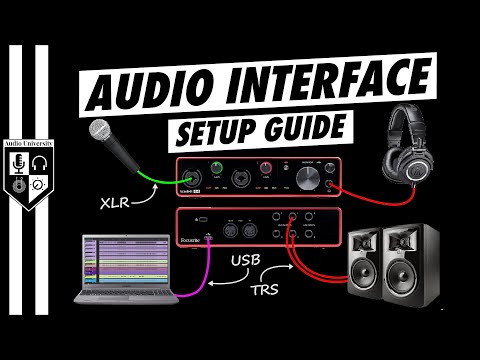
Setting up a home studio is one of the most exciting investments a musician, podcaster, or content creator can make. And while microphones, monitors, and software often steal the spotlight, the unsung hero of any serious recording setup is the audio interface for home studio work. Without it, your computer simply cannot capture high-quality sound with the precision, reliability, and low latency that professional audio demands. Whether you are a bedroom producer laying down vocal tracks, a voiceover artist building a client roster, or a band tracking full-band arrangements, choosing the right audio interface shapes everything from sound quality to workflow efficiency. This guide dives deep into what these devices do, how to select the best one for your needs, and which models deliver the most value across every budget tier.
What Is an Audio Interface for a Home Studio?
An audio interface is an external hardware device that bridges your microphones, instruments, and studio monitors with your computer. It converts analog audio signals into digital data your recording software can process and, equally important, converts digital audio back into analog sound you can hear through your monitors or headphones. Think of it as the central nervous system of your recording chain. Built-in sound cards on laptops and desktops are designed for casual listening, not studio-grade recording. They introduce noise, higher latency, and limited input options that can bottleneck your creative process.
A dedicated home studio audio interface solves these problems with purpose-built preamps, dedicated AD/DA converters, and specialized driver architectures that keep your system responsive even during demanding multitrack sessions.
Why You Need an Audio Interface Instead of Built-In Audio
Many beginners wonder whether they truly need a separate interface. The short answer is yes, if you care about sound quality and workflow. Here is a detailed look at why onboard audio falls short for serious studio work.
Latency and Driver Support
Latency is the delay between when you play or sing a note and when you hear it back through your monitoring system. Built-in audio uses generic operating system drivers that introduce significant latency, making real-time recording nearly impossible. Audio interfaces use specialized driver protocols like ASIO on Windows and Core Audio on macOS, which dramatically reduce latency — often down to just a few milliseconds. For home studio producers tracking instruments or vocals in real time, this difference is non-negotiable.
Sound Quality and Preamp Performance
The preamplifier inside an audio interface is what boosts your microphone or instrument signal to a usable recording level. Cheap onboard audio uses low-quality preamps that add self-noise, color the signal, and clip easily. Professional interfaces feature low-noise, high-headroom preamps that capture the full dynamic range of your source with transparency and warmth. This is especially critical when recording acoustic guitars, quiet vocals, or ribbon microphones.

Key Features to Look For in a Home Studio Audio Interface
Not all audio interfaces are created equal. Before you buy, consider these technical and practical factors that directly impact your recording experience.
Input and Output Configuration
The number and type of inputs you need depends entirely on what you record. A solo singer-songwriter might only need one XLR microphone input and one 1/4-inch instrument jack. A full band tracking drums will require multiple inputs with independent gain control. Consider these common configurations:
- 1-2 inputs: Ideal for solo vocalists, podcasters, and guitarists recording one track at a time.
- 4 inputs: Perfect for duos, acoustic duos, or any situation requiring simultaneous stereo recording.
- 8 or more inputs: Essential for bands, drum kits, and multi-mic setups.
Outputs matter just as much. Look for balanced TRS or XLR monitor outputs for noise-free monitoring, and consider headphone outputs with independent volume control if multiple people need to listen simultaneously.
Connectivity: USB vs. Thunderbolt
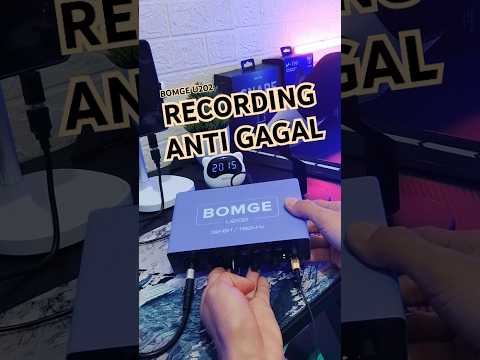
Connectivity determines both audio quality and maximum channel count. USB 2.0 and USB 3.0 remain the most common and affordable options, handling up to 8 inputs/outputs reliably. Thunderbolt interfaces offer significantly lower latency and higher bandwidth, making them ideal for large-scale projects with dozens of virtual instruments and tracks. PCIe interfaces installed directly into a desktop computer’s motherboard deliver the lowest possible latency and the most robust performance, but they sacrifice portability.
Bit Depth and Sample Rate
Bit depth determines your recording’s dynamic range and resolution. 24-bit is the current industry standard for home studios, offering a massive 144 dB of dynamic range — more than enough for any recording environment. Sample rate refers to how many times per second the audio signal is captured. 44.1 kHz covers the full range of human hearing and is sufficient for most projects, while 48 kHz and 96 kHz are used for post-production and archival-quality recordings.
Best Audio Interfaces for Home Studios by Budget
Selecting the right interface means matching features to your actual needs rather than chasing the most expensive option. Below is a comparison of top contenders across three budget categories.
| Interface | Inputs | Connectivity | Key Strength | Approx. Price |
| Focusrite Scarlett 2i2 (4th Gen) | 2 combo | USB-C | Best overall value and preamp quality | $179 |
| Universal Audio Volt 2 | 2 combo | USB-C | Vintage preamp character and built-in compressor | $199 |
| PreSonus AudioBox USB 96 | 2 combo | USB | Affordable with bundled software suite | $100 |
| Steinberg UR44 | 4 combo | USB | Excellent DSP monitoring and MIDI I/O | $250 |
| Audient iD14 MkII | 2 combo | USB-C | Class-A console preamp and AD/DA converters | $249 |
| RME Babyface Pro FS | 2 combo | USB 2.0 | Ultra-low latency and legendary driver stability | $700 |
The Focusrite Scarlett 2i2 remains the go-to recommendation for most home studio beginners because it offers a balanced feature set at an accessible price point. However, if you prioritize vintage warmth and need a built-in dynamics processor, the Universal Audio Volt 2 is a compelling alternative. Advanced users who demand the absolute lowest latency and rock-solid driver performance should seriously consider RME, even at a higher price point.
Expert Tips for Choosing and Using Your Audio Interface

Getting the most out of your audio interface goes beyond just plugging it in. Follow these practical recommendations to ensure optimal performance and longevity in your home studio setup.
- Match your interface to your workflow. If you record one track at a time, a 2-input interface saves money and desk space. Do not pay for 8 inputs if you only need 2.
- Invest in quality cables. Even the best interface sounds mediocre with cheap, unshielded cables. Balanced TRS cables reduce electromagnetic interference and hum in longer cable runs.
- Use a dedicated USB or Thunderbolt hub if needed. Power-hungry interfaces can cause dropouts when connected to a USB hub shared with external hard drives and other peripherals. A powered hub or a direct connection to the computer is always preferable.
- Update your drivers regularly. Interface manufacturers frequently release driver updates that improve stability, reduce latency, and fix compatibility issues with new operating systems.
- Calibrate your monitoring levels. Use a reference measurement tool like REW (Room EQ Wizard) to set your monitor output level at a consistent 85 dB SPL, ensuring accurate mixing and mastering decisions.
- Consider future expansion. If you plan to grow your setup over time, choose an interface with additional inputs or a Daisy Chain port that allows you to chain multiple units together.
Frequently Asked Questions (FAQs)
What is the best audio interface for a beginner home studio?
The Focusrite Scarlett 2i2 is widely regarded as the best entry-level audio interface for beginners. It offers 24-bit/192 kHz conversion, clean preamps with 56 dB of gain, and USB-C connectivity at a price that makes it the most practical first purchase for new home studio owners.
Do I need an audio interface if I only record podcasts?
While you can record a basic podcast using a USB microphone directly into your computer, an audio interface gives you significantly better sound quality, the ability to connect professional XLR microphones, and real-time monitoring with near-zero latency. For any podcaster planning to upgrade beyond a USB headset, an interface is an essential investment.
Can I use an audio interface without a computer?
Some interfaces include standalone monitoring capabilities and even basic mixing features that allow limited operation without a computer. However, for full recording, editing, and mixing workflows, a computer running a digital audio workstation remains required. The interface’s role is to connect your analog sources to that computer environment with the highest possible fidelity.
Is Thunderbolt really better than USB for audio interfaces?
Thunderbolt offers lower latency and higher bandwidth than USB, which matters when running large projects with dozens of tracks and plugins simultaneously. However, for most home studio setups recording fewer than 8 simultaneous inputs, USB 3.0 provides more than enough bandwidth with negligible latency differences in practice.
How much should I spend on a home studio audio interface?
A quality home studio audio interface typically ranges from $100 to $300 for most producers and musicians. Spending more than $500 usually makes sense only if you need professional-grade converters, extensive I/O, or the signature sonic character of high-end preamps from brands like Universal Audio or Audient.
Conclusion
The audio interface for home studio work is far more than a simple adapter between your gear and your computer. It is the foundation upon which your entire recording chain rests. From transparent preamps and low-latency monitoring to pristine AD/DA conversion, the right interface unlocks the true potential of your microphones, instruments, and studio monitors. Whether you are just starting out with a basic Scarlett or stepping up to a premium RME, the key is matching the interface to your actual recording needs, your budget, and your long-term creative ambitions. Invest wisely, pair it with quality microphones and monitors, and you will have a home studio setup capable of producing professional-grade audio for years to come.