


Ableton Live music production software has fundamentally reshaped how producers, DJs, sound designers, and electronic musicians approach the creative process. Unlike many traditional digital audio workstations that follow a linear timeline paradigm, Ableton Live was built from the ground up around a unique dual-view interface that seamlessly integrates composition, performance, and mixing into a single cohesive environment. Whether you are a bedroom producer just starting out or a seasoned professional working on major releases, understanding what makes Ableton Live tick—and how to leverage its full potential—can elevate your entire workflow to a professional level.
What Is Ableton Live and Why Does It Matter?
Ableton Live is a digital audio workstation developed by the German company Ableton, headquartered in Berlin. First released in 2001 by founders Robert Henke and Gerhard Behles—who were also pioneers in electronic music performance—Ableton Live was designed to blur the line between studio production and live performance. The software operates in two primary views: Session View, which organizes audio and MIDI clips in a non-linear grid for improvisation and launching, and Arrangement View, which provides a traditional linear timeline for detailed editing and final arrangement. This duality is what sets Ableton Live apart from competing DAWs like FL Studio, Logic Pro, and Pro Tools.
The software has become an industry standard in electronic music genres including techno, house, ambient, hip-hop, and experimental sound design. Artists like Skrillex, Deadmau5, and Flying Lotus have used Ableton Live as their primary production tool, cementing its reputation as one of the most powerful and versatile platforms in modern music production.
Core Features That Define the Ableton Live Experience
Ableton Live’s feature set is remarkably deep, but several elements stand out as defining characteristics that music producers return to again and again.
Session View and Non-Linear Workflow
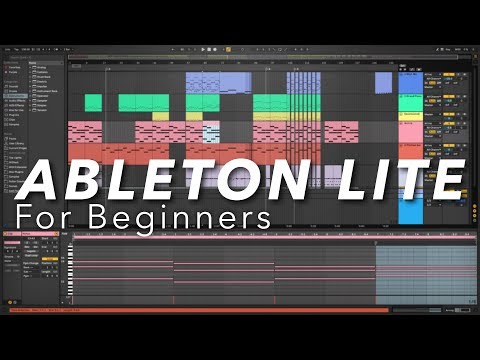
The Session View is arguably the most iconic feature of Ableton Live. It allows you to trigger and arrange musical ideas in real time, making it exceptionally well-suited for live performances, jamming, and experimenting with arrangements. Each row represents a track, and individual clips can be launched independently or in sync, giving you the freedom to rearrange a song on the fly. This non-linear approach means you can build a track organically without committing to a fixed order from the start.
Warping and Time-Stretching
Ableton’s warping engine is one of the most sophisticated in any music production software. It allows you to change the tempo or duration of audio clips without affecting their pitch—or vice versa—with remarkable accuracy. The automatic warping mode detects transients and tempo intelligently, while manual warp markers give you surgical control over how audio behaves within a project. This is particularly valuable when working with sample packs, vinyl recordings, or collaborating with musicians who recorded at different tempos.
Instrument Racks, Audio Effects, and Max for Live
The built-in instrument and effect devices in Ableton Live are exceptionally well-crafted. Simpler and Sampler handle sample playback and manipulation, while Operator, Wavetable, and Collision provide powerful synthesis options. Audio effects like Echo, Reverb, Delay, and the dynamic EQ offer professional-grade sound shaping. Perhaps the most powerful addition is Max for Live, a visual programming environment embedded directly into Ableton Live that allows you to create custom devices, effects, and tools from scratch or use the vast community library of user-built devices.
Ableton Live Editions: Choosing the Right Version
Ableton Live is available in three distinct editions, each tailored to different stages of a producer’s journey. Selecting the right one depends on your workflow needs, budget, and the complexity of your projects.
| Feature | Intro | Standard | Suite |
| Price (approx.) | $99 | $449 | $749 |
| Audio Tracks | 16 | Unlimited | Unlimited |
| MIDI Tracks | 16 | Unlimited | Unlimited |
| Max for Live Devices | No | No | Yes (Full Library) |
| Built-in Instruments | Limited | Moderate | Extensive (Wavetable, Collision, Tension, etc.) |
| Built-in Effects | Limited | Good Selection | Complete Suite |
| Audio-to-MIDI Conversion | No | Yes | Yes |
| Multicore Support | No | Yes | Yes |
For most working producers, Ableton Live Standard offers the best balance of features and value. The Suite edition is the choice for sound designers, composers, and producers who rely heavily on virtual instruments and Max for Live devices. Intro serves as an affordable entry point but has significant limitations that may hinder growth for serious producers.
Why Producers Choose Ableton Live Over Other DAWs
The decision to commit to Ableton Live often comes down to a combination of workflow philosophy, creative flexibility, and ecosystem support. Here are the primary reasons producers gravitate toward this platform:
- Speed of iteration: The non-linear Session View allows producers to test arrangements, layer sounds, and generate ideas faster than almost any other DAW. You can audition multiple song structures in minutes without committing to a permanent arrangement.
- Live performance capability: Ableton Live is purpose-built for live electronic performance, with features like clip launching, MIDI mapping, and real-time effects processing that make it the go-to choice for electronic musicians performing on stage.
- Exceptional warping engine: As mentioned earlier, time-stretching and pitch manipulation are handled with a level of polish that saves hours of tedious editing.
- Sound design depth: The combination of native instruments, effects, and Max for Live creates an environment where sound design is not an afterthought—it is a core part of the creative process.
- Community and resources: Ableton has one of the largest and most active user communities online, with thousands of tutorials, Max for Live device packs, templates, and forums available to help producers at every skill level.
- Consistent updates: Ableton regularly releases updates with new features, workflow improvements, and stability enhancements, demonstrating long-term commitment to the product.
Getting Started: Practical Tips for Beginners
If you are new to Ableton Live, the learning curve can feel steep at first, but a structured approach makes all the difference. Start by spending time in Session View, simply triggering clips and experimenting with how different sounds interact. Do not immediately try to build a full song—focus on understanding how tracks, scenes, and clips relate to each other. Once you are comfortable with Session View, transition to Arrangement View to learn how linear editing works.
- Master keyboard shortcuts. Ableton Live is highly keyboard-driven, and learning shortcuts for common actions like splitting clips, duplicating, and zooming dramatically accelerates your workflow.
- Use the built-in tutorial project. Ableton includes a thoroughly annotated set of demo tracks that walk you through every feature in context.
- Explore the browser deeply. The Ableton browser is more than a file manager—it is a search tool that filters sounds by key, tempo, genre, and character, making it one of the most efficient sound-finding tools in any DAW.
- Learn to use warping early. Understanding how to warp audio clips will save you enormous amounts of time when working with samples and recorded material.
- Customize your template. Set up a project template with your preferred tracks, routing, effects chains, and color coding so you can start producing immediately every time you open Ableton.
Expert Tips for Intermediate and Advanced Users

Once you have mastered the basics, there are several techniques that separate casual users from power producers. Rack chains allow you to group multiple devices into a single unit and map macros for real-time control. Using follow actions in Session View enables automated clip launching, creating generative and evolving arrangements without manual input. Producers working with complex projects should learn group tracks for efficient bus processing, and take advantage of return tracks with shared effects like reverb, delay, and saturation to maintain a clean and cohesive mix.
For those pushing into advanced sound design, combining Max for Live with Ableton’s native devices opens virtually unlimited creative possibilities. Devices like Granulator III, 8-band EQ, and various community-built tools allow for textures and transformations that would require expensive third-party plugins elsewhere. Additionally, using MIDI effects like Arpeggiator, Random, and Scale within your instrument racks can generate complex, evolving patterns with minimal manual input.
System Requirements and Compatibility
Ableton Live runs on both macOS and Windows. The latest version, Ableton Live 12, requires a reasonably modern computer with a multi-core processor, at least 4 GB of RAM (8 GB or more recommended), and an audio interface for low-latency monitoring. A dedicated sound card is highly recommended for any serious production work, as built-in computer audio often introduces latency and audio artifacts that can disrupt your creative flow.
Final Thoughts on Ableton Live as Your Music Production Software
Ableton Live stands out not just as a DAW but as a creative instrument in its own right. Its unique approach to music-making—combining non-linear experimentation with detailed linear editing—makes it equally powerful for studio production and live performance. Whether you are producing beats, crafting ambient soundscapes, performing electronic sets, or scoring for film and media, Ableton Live provides the tools, flexibility, and sonic quality to bring your vision to life. Investing time in learning its deeper features pays dividends that compound over every project you work on.
Frequently Asked Questions
Is Ableton Live suitable for beginners who have never used a DAW before?
Yes, Ableton Live is beginner-friendly thanks to its intuitive drag-and-drop workflow, comprehensive built-in tutorials, and the Session View’s visual approach to music-making. However, beginners should commit to spending dedicated time learning the interface and core concepts before expecting professional results. Starting with Ableton Live Intro or the free 90-day trial of the full version allows new users to evaluate the software without a financial commitment.

Can Ableton Live be used for professional mixing and mastering?
Absolutely. Ableton Live includes professional-grade effects including EQ, compression, limiting, and spatial processing that are more than capable of handling mixdown and mastering tasks. Many professional engineers use Ableton Live for mixing, particularly in electronic and pop genres. When combined with reference tracks and proper monitoring, the mixing and mastering capabilities rival those of dedicated mixing platforms.
What makes Ableton Live different from FL Studio or Logic Pro?
Ableton Live’s defining difference is its dual-view workflow—Session View for non-linear performance and Arrangement View for linear editing. FL Studio also features a pattern-based workflow but lacks the integrated live performance focus, while Logic Pro follows a more traditional linear arrangement model with exceptional built-in sounds but does not offer the same real-time improvisational capabilities. Each DAW excels in different areas, but Ableton Live’s unique workflow makes it the preferred choice for electronic music production and live performance.
Does Ableton Live support third-party VST plugins?
Yes, Ableton Live fully supports third-party VST plugins on Windows and Audio Units (AU) plugins on macOS. You can integrate virtually any virtual instrument or effect plugin into your Ableton projects. The software also supports VST3 and AU formats, ensuring compatibility with modern plugin formats from major developers like Native Instruments, Spectrasonics, and FabFilter.
How often does Ableton release major updates?
Ableton typically releases major version updates every one to two years, with each update bringing significant new features, workflow improvements, and stability enhancements. Between major releases, the company provides smaller incremental updates that address bugs, improve performance, and occasionally introduce new devices or features. Users with active maintenance contracts receive these updates at no additional cost.
Can I use Ableton Live for live DJing and performance?
Yes, Ableton Live is one of the most popular choices for live electronic performance. Its Session View was literally designed for this purpose, allowing DJs and live performers to trigger loops, samples, and effects in real time. Combined with MIDI controllers, Ableton Link for synchronized tempo sharing across devices, and Max for Live for custom performance tools, it offers a performance environment that few other DAWs can match.