If you are serious about producing music or even just starting to explore the world of audio creation, choosing the right computer programs for mixing music can make or break your entire workflow. The digital audio workstation landscape has exploded over the past decade, giving producers access to tools that were once confined to million-dollar recording studios. Whether you are a bedroom beatmaker crafting your first track or a seasoned audio engineer mixing a full-length album, the software you choose shapes everything from your creative process to the final sound quality of your project. In this guide, we will dive deep into the best music mixing programs available today, break down essential features you should prioritize, and share expert recommendations tailored to every skill level.
What Are Computer Programs for Mixing Music?
A computer program for mixing music, commonly referred to as a digital audio workstation or DAW, is software designed to record, edit, arrange, and mix multiple audio tracks into a cohesive final product. These programs allow producers to layer vocals, instruments, synthesizers, and samples on separate tracks, then balance levels, apply effects like EQ and compression, and export a polished master file. Modern mixing software goes far beyond simple volume faders; it includes built-in virtual instruments, real-time audio processing, MIDI editing, automation lanes, and plugin support that can transform a basic laptop into a full-featured home recording studio.
The best music mixing software today integrates seamlessly with third-party plugins, giving you access to thousands of virtual instruments and effects processors from industry-leading developers. This flexibility means your creative possibilities are virtually limitless, regardless of your budget or experience level.
Top Digital Audio Workstations for Music Mixing
Free and Budget-Friendly Options for Beginners
If you are just starting out and do not want to invest heavily upfront, several free music mixing programs deliver surprisingly professional results.
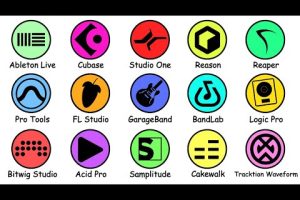
- Cakewalk by BandLab — A fully featured Windows DAW that was once a premium product. It now offers unlimited tracks, built-in effects, and a thriving community.
- Audacity — A lightweight open-source option perfect for simple recording and basic mixing tasks. It lacks advanced MIDI capabilities but is ideal for podcast editing and quick edits.
- GarageBand — Apple’s free DAW comes pre-installed on Macs and iPhones. It provides an intuitive interface, a rich sound library, and excellent integration with Logic Pro for users who eventually upgrade.
These beginner-friendly programs let you learn core mixing concepts like gain staging, panning, and effect routing without spending a dime.
Professional-Grade DAWs for Serious Producers
When you are ready to level up, these industry-standard mixing programs offer unmatched depth and flexibility.
- Ableton Live — Dominates the electronic music and live performance scenes. Its session view enables non-linear composition, making it ideal for beat makers and loop-based producers.
- Logic Pro — Apple’s flagship DAW combines a massive sound library with professional mixing and mastering tools at a one-time purchase price of around $200.
- FL Studio — Hugely popular among hip-hop and EDM producers, FL Studio features a pattern-based workflow that streamlines beat creation and multi-track mixing.
- Pro Tools — The gold standard for studio recording and professional audio mixing. Its editing precision and advanced automation make it the go-to choice for major label projects.
- Studio One — PreSonus’s DAW has rapidly gained popularity thanks to its drag-and-drop workflow, excellent mastering tools, and competitive pricing.
Key Features to Evaluate in Mixing Software
Not all audio mixing programs are created equal. When comparing options, focus on the features that align with your specific production goals.
- Multi-track recording and editing — Ensure the software supports unlimited or high track counts so you can layer complex arrangements without hitting limitations.
- Built-in effects and instruments — Look for EQ, compression, reverb, delay, and virtual synths included out of the box to save money on third-party plugins.
- Plugin compatibility — VST, AU, and AAX support lets you expand your sonic palette with premium third-party tools.
- Automation capabilities — Advanced automation lanes let you modulate parameters over time, adding movement and dynamics to your mix.
- Latency management — Low-latency audio engines ensure real-time monitoring during recording sessions without distracting delays.
- Collaboration tools — Cloud sharing, version control, and remote collaboration features are increasingly important in modern music production.
Best DAWs by Skill Level and Use Case
The table below compares leading mixing programs across critical criteria to help you narrow down your options.
| DAW | Price | Best For | Platform |
| GarageBand | Free | Beginner Mac producers | macOS, iOS |
| Cakewalk by BandLab | Free | Windows-based full production | Windows |
| FL Studio | $99–$499 | Hip-hop, EDM, beat making | Windows, macOS |
| Ableton Live | $99–$749 | Electronic music, live performance | Windows, macOS |
| Logic Pro | $199 | All-around professional production | macOS |
| Pro Tools | $29.25/mo | Studio recording, professional mixing | Windows, macOS |
| Studio One | $99–$399 | Workflow efficiency, mastering | Windows, macOS |
Expert Tips for Maximizing Your Mixing Software

Even the most powerful music editing software will not deliver great results if you do not understand how to use it effectively. Here are proven strategies that experienced producers swear by.
Start with a clean session. Organize your tracks from day one by labeling each channel, color-coding instrument groups, and keeping your arrangement tidy. A messy session leads to confusion and mistakes during critical mixing stages.
Learn gain staging before reaching for plugins. Many beginners drown their tracks in effects without first ensuring proper levels at each stage of the signal chain. Clean gains mean cleaner mixes and more headroom for processing.
Reference commercial tracks. Load a professionally mixed song into your DAW and compare it side by side with your own work. This practice sharpens your ears and reveals gaps in frequency balance, stereo width, and dynamics.
Invest in training resources. YouTube channels, online courses, and official DAW tutorials can accelerate your learning curve dramatically. Spend time understanding not just what each effect does, but when and why to apply it.
Take regular breaks. Ear fatigue is a real productivity killer. Mixing for extended periods without rest leads to poor decision-making. The best producers schedule short breaks every 45 to 60 minutes.
Conclusion

Selecting the right computer programs for mixing music is one of the most important decisions any producer can make. The DAW you choose shapes your creative workflow, determines your sonic capabilities, and ultimately influences the quality of the music you release. Whether you start with a free program like GarageBand or Cakewalk and gradually upgrade to a professional tool like Logic Pro or Ableton Live, the key is to focus on mastering fundamentals rather than chasing features. Build a solid foundation in mixing theory, invest time in learning your chosen software inside and out, and let your creative instincts guide you. The best mixing program is the one that feels intuitive, supports your genre, and grows with you as your skills evolve.
Frequently Asked Questions
What is the best free computer program for mixing music?
Cakewalk by BandLab is widely considered the best free music mixing program for Windows users, offering professional-grade features including unlimited audio and MIDI tracks, built-in effects, and full plugin support. For Mac users, GarageBand provides an equally compelling free entry point with a polished interface and a rich built-in sound library.
Can I mix music on a laptop, or do I need a desktop computer?
Absolutely. Modern music mixing software runs efficiently on laptops, and many producers create entire albums on portable computers. The key is ensuring your laptop has a dedicated audio interface, sufficient RAM (at least 8 GB recommended), and a solid-state drive for fast sample loading. Desktop computers offer more raw processing power and expansion options, but a well-configured laptop handles professional mixing workloads with ease.
What are the key differences between free and paid music mixing software?
Free programs like Audacity and GarageBand typically limit advanced features such as third-party plugin support, MIDI editing depth, and multi-bus routing. Paid DAWs unlock professional-grade tools including advanced automation, surround sound mixing, integrated mastering suites, and regular updates with new features. That said, several free options have closed the gap significantly, and many producers start free before upgrading when their needs demand more.
How do I choose the right DAW for my music genre?
Your genre should heavily influence your DAW choice. Ableton Live excels for electronic music and live performance due to its session-based workflow. FL Studio dominates hip-hop and beat production with its pattern sequencer. Pro Tools remains the industry standard for recording bands and mixing full albums. Logic Pro offers a balanced all-rounder suitable for virtually any genre, from pop to orchestral composition.
Is it worth learning multiple mixing programs as a producer?
Yes, learning multiple DAWs broadens your professional versatility and deepens your understanding of audio mixing concepts across different workflows. Many producers start with one DAW and eventually adopt a second for specific tasks — for example, using Pro Tools for studio sessions and Ableton Live for electronic production. However, mastering one program thoroughly before branching out yields better results than spreading your focus too thin.
What hardware do I need to get started with a music mixing program?
At minimum, you need a computer with a multi-core processor, at least 8 GB of RAM, and a dedicated audio interface for low-latency monitoring. A pair of studio-grade headphones or nearfield monitors is essential for accurate mixing decisions. A MIDI controller accelerates workflow significantly if you work with virtual instruments. Beyond these basics, the specific hardware depends on your production style and budget — but a basic setup can produce professional-quality mixes with today’s software.