


Audiotool.com has emerged as one of the most compelling free browser-based music production platforms on the internet, giving aspiring and established producers alike the tools they need to compose, mix, and share tracks without ever installing a single application. Whether you are a bedroom beatmaker experimenting with your first loop or a seasoned electronic artist looking for a collaborative workflow, audiotool.com delivers a surprisingly powerful environment that rivals many desktop digital audio workstations. In this deep dive, we explore everything you need to know about the platform, from its core features and device-based workflow to practical tips, comparisons, and frequently asked questions that will help you get the most out of this remarkable online production tool.
What Is Audiotool.com and Why Does It Matter?
Audiotool is a fully browser-based digital audio workstation that allows users to create music using a modular, device-driven interface. Launched as a free platform, it operates entirely in your web browser, meaning there is no need for expensive hardware or software downloads. The platform runs on cloud infrastructure, saving your projects automatically and letting you access them from any device with an internet connection. For producers who want a streamlined path into music creation without the learning curve of professional-grade DAWs like Ableton Live or FL Studio, audiotool.com offers an accessible yet surprisingly deep creative environment.
The platform was developed by a team of engineers and musicians who recognized that many young producers were being priced out of professional software. By building a free, browser-based alternative, they democratized access to music production tools. Today, audiotool.com hosts a thriving community of over a million registered users who share millions of tracks, remixes, and samples within the platform.
Key Features of Audiotool
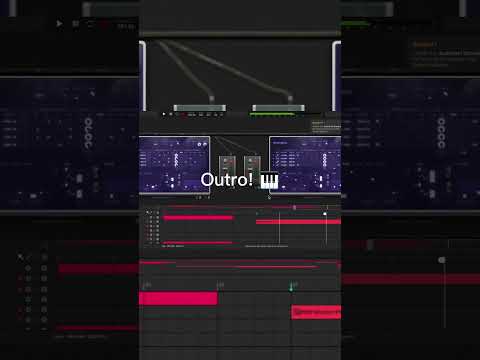
Device-Based Production Workflow
The defining characteristic of audiotool.com is its device-based production approach. Instead of a traditional linear timeline, users work with virtual devices including synthesizers, drum machines, samplers, effects processors, and mixers. Each device functions as an independent module that you connect on a visual canvas. This modular workflow closely mirrors hardware studio setups, making it intuitive for producers who have experience with physical gear while remaining approachable for complete beginners.
Some of the standout devices on the platform include:
- Synth1 and Synth2 — built-in synthesizers offering waveform generation, filters, and modulation
- Drum machines and samplers — for programming beats and triggering audio clips
- Mixer channels — with EQ, panning, and volume controls per track
- Effects devices including reverb, delay, distortion, and compression
- LFO and envelope generators — for automating movement and dynamics
Social Music Network
What sets audiotool.com apart from most other online DAWs is its deeply integrated social network. Every track you create becomes part of a community-driven platform where users can listen, comment, remix, and follow one another. This social layer transforms production from a solitary activity into a collaborative experience. Producers can publish their work, receive real-time feedback, and even have their tracks remixed by other community members — creating a virtuous cycle of creative exchange that accelerates skill development.
Remix Culture and Sample Library
Audiotool has built its identity around remix culture. Users can upload their own samples, download stems from other producers, and create remixes directly within the platform. The built-in sample library provides a solid foundation of drum sounds, synth presets, and effect recordings. Additionally, the platform supports user-generated content, meaning the library grows organically as the community contributes new material.
Who Should Use Audiotool.com?
Audiotool.com serves a remarkably broad audience across different skill levels and musical genres. Here is a breakdown of who benefits most from the platform:
- Beginners and students — The visual, device-based interface lowers the barrier to entry. New producers can experiment with sound design, rhythm, and arrangement without investing in expensive software or formal training.
- Electronic music producers — Genres like EDM, hip-hop, trap, lo-fi, and ambient thrive on the platform. The built-in synthesizers and samplers are particularly well-suited for beat-driven and electronic music styles.
- Collaborative teams — Producers who want to work remotely on shared projects benefit from the cloud-based workflow and remix capabilities.
- Music educators — Teachers use audiotool.com in classrooms to introduce students to music production concepts in a safe, free, and accessible environment.
- Social media content creators — Producers who need quick, high-quality beats for YouTube videos, TikTok content, or podcast intros find the platform efficient for on-demand production.
Audiotool.com vs. Competitors
To understand where audiotool.com stands in the online music production landscape, it helps to compare it directly against other popular browser-based platforms. The table below highlights the key differences.
| Feature | Audiotool.com | BandLab | Soundtrap | Soundation |
| Pricing Model | Free with optional premium features | Free with premium tier | Free with premium plans | Free with paid upgrades |
| Workflow Style | Modular device-based canvas | Linear timeline | Linear timeline | Track-based linear |
| Social Network | Deeply integrated | Integrated community | Basic sharing features | Limited social features |
| Remix Capabilities | Excellent — core feature | Good | Limited | Moderate |
| Mobile Support | Browser-based, responsive | Dedicated app available | Mobile app available | Browser-based |
| Advanced Features | LFO, envelopes, modular routing | Basic to intermediate | Intermediate | Intermediate |
| Community Size | Over 1 million users | Very large | Moderate | Smaller community |
| Best For | Electronic music, modular production | General-purpose, all genres | Podcasts, collaboration | Quick compositions |
The modular, device-driven approach of audiotool.com gives it a distinct edge for producers who value flexibility and sound design exploration. While BandLab may win on sheer user numbers and Soundtrap excels at podcast-style collaboration, audiotool.com carves out a unique niche by combining production power with an engaging social ecosystem.
Getting Started with Audiotool
Starting with audiotool.com is straightforward and requires minimal setup. Follow these steps to begin producing music in minutes:
- Create a free account — Visit audiotool.com and sign up using your email, Google account, or Facebook login.
- Explore the workspace — Familiarize yourself with the device canvas, the timeline view, and the mixer panel.
- Add your first device — Drag a synthesizer or drum machine onto the canvas and start experimenting with presets.
- Connect devices — Route audio from your sound generators through effects processors to the mixer for a complete signal chain.
- Save and share — Your projects auto-save to the cloud. When you are ready, publish your track to the audiotool community for feedback and exposure.
Expert Tips for Maximizing Audiotool
Once you are comfortable with the basics, these expert recommendations will help you unlock the full potential of audiotool.com:
- Study popular tracks on the platform. Listening to top-rated productions within the community reveals creative routing techniques and sound design approaches you can adapt for your own work.
- Use LFOs and envelopes creatively. Automating parameters like filter cutoff, volume, and panning adds movement and interest to otherwise static patches.
- Collaborate early and often. Sharing works-in-progress and inviting remixes accelerates your learning curve and builds your network within the community.
- Upload custom samples. While the built-in library is solid, importing your own samples gives you a unique sonic identity that sets your productions apart.
- Experiment with signal chain ordering. The order in which you connect effects devices dramatically changes the character of your sound. Try running distortion before reverb for radically different results than the reverse order.
- Export and integrate with other tools. You can export finished projects and stems, allowing you to use audiotool.com as a starting point and finish tracks in more advanced desktop DAWs when needed.
Frequently Asked Questions
Is audiotool.com completely free to use?

Yes, audiotool.com offers a robust free tier that includes access to the core production devices, community features, and cloud storage. While there may be optional premium upgrades or perks available, the free version provides everything you need to produce, share, and collaborate on music at a professional level.
Can I use audiotool.com on my phone or tablet?
Audiotool.com runs in your web browser, which means it is accessible on any device with an internet connection, including smartphones and tablets. However, the experience is optimized for desktop and laptop screens due to the complexity of the device canvas interface. Using a tablet with a larger screen and a stylus will provide the best mobile experience.
Does audiotool.com support MIDI controllers and external hardware?
While audiotool.com is primarily a browser-based platform, it does support some MIDI controller integration depending on browser capabilities and hardware. The exact level of external hardware support may vary, so it is recommended to check the platform’s latest documentation for compatibility details with your specific MIDI keyboard or controller.
What genres of music work best on audiotool.com?
The platform is particularly well-suited for electronic music genres such as EDM, hip-hop, trap, lo-fi, synthwave, and ambient. The modular device workflow excels at beat programming and synthesis-based production. That said, creative producers have used audiotool for a wide range of genres, and the platform’s flexibility allows for experimentation across musical styles.
How does audiotool.com handle project collaboration?
Audiotool.com supports collaboration through its remix and sharing features. Users can publish tracks publicly or privately, share direct links with collaborators, and enable remix permissions. Other producers can take stems from published tracks and build new compositions around them, creating a seamless collaborative workflow entirely within the browser.
Final Thoughts
Audiotool.com stands as a testament to what is possible when music production tools are made accessible, social, and free. It successfully bridges the gap between simple online beat makers and full-featured digital audio workstations, offering a modular production environment that rewards creativity and experimentation. Whether you are taking your first steps into music production or looking for a collaborative cloud-based workflow, audiotool.com delivers an experience that is both powerful and genuinely enjoyable. The combination of deep production features, an engaged community, and zero cost makes it one of the most valuable resources available to today’s music creators. Dive in, start building, and watch as the platform transforms your creative ideas into polished, shareable tracks.