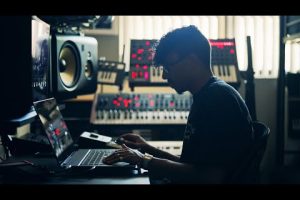
When you step into the world of music production, one truth becomes immediately clear: your digital audio workstation is only as powerful as the machine running it. Whether you are laying down vocal tracks in a home studio or orchestrating a cinematic score at a professional facility, the best computer for music production acts as the central nervous system of your entire creative process. Many aspiring producers get swept up in the allure of expensive audio interfaces or vintage microphones, but neglecting your computing power will lead to frustrating latency issues, buffer underruns, and dropped audio. Finding the right machine means balancing raw processing power with specific audio demands. This guide breaks down everything you need to know, from essential hardware specifications to top-tier recommendations across every budget and skill level, ensuring you invest in a rig that keeps pace with your creativity.
Why Your Computer Matters for Music Production
The Shift from Hardware to Software
Gone are the days when a hardware synthesizer was the only way to generate rich, complex sounds. Today, a single laptop or desktop can host hundreds of virtual instruments, effect plugins, and multitrack sessions simultaneously. When you load up a session in Ableton Live, Logic Pro, or FL Studio, you are essentially asking your processor to juggle dozens of real-time audio calculations. The central processing unit handles these tasks, while the random access memory stores the active data for quick access. If your machine lacks in either department, you will experience the dreaded latency spike that causes pops, clicks, or audio dropouts. Understanding how these components interact is the first step toward choosing the best computer for music production that won’t buckle under pressure when your project grows.
The Audio Production Hardware Trinity
When evaluating the best computer for music production, you must prioritize a multi-core processor with high clock speeds. Audio plugins like Omnisphere, Kontakt, or complex chains of EQ and compression are notoriously CPU-intensive. A minimum of an Intel Core i7 or AMD Ryzen 7 is advisable, though intermediate producers should aim for an i9 or Ryzen 9. For Apple Silicon enthusiasts, the M2 Pro or M3 Pro chips offer incredible single-core performance and phenomenal power efficiency, which directly translates to lower noise floors and cooler running temperatures in tight studio environments.
Next, RAM serves as your session’s short-term memory. While 8GB might technically run a DAW, you will hit a wall quickly when loading large orchestral templates or running multiple virtual instruments. For serious music production, 32GB of RAM is the sweet spot, allowing you to load massive sample libraries without constantly clearing your cache. If you are scoring films with hundreds of tracks, 64GB ensures you never have to freeze tracks just to save your project from crashing. Finally, storage is non-negotiable. Traditional hard disk drives are far too slow for modern audio workflows. You need a solid-state drive, specifically an NVMe M.2 drive, for your operating system, DAW, and active projects. SSDs drastically reduce load times and eliminate the stuttering that occurs when your drive cannot feed audio data to the CPU fast enough.
Top Desktop Workstations for Studio Pros
If you prioritize maximum power and upgradeability, a custom desktop or an all-in-one workstation is the ultimate choice for the best computer for music production. Desktops allow you to replace failing parts, add more RAM down the road, and install multiple high-speed storage drives without compromising portability. For the hardcore producer, building a custom PC around an AMD Ryzen 9 7950X or an Intel Core i9 paired with 64GB of DDR5 RAM delivers unparalleled multi-track handling capabilities.
On the Apple ecosystem side, the Mac Studio with the M2 Ultra chip represents the pinnacle of desktop audio performance. It handles extreme session counts and massive orchestral templates with ease, all while remaining whisper-quiet. The Mac Studio also supports multiple high-resolution displays, which is a massive productivity boost when you are managing complex mixer layouts or video synchronization tasks. For professionals who mix and master commercially, the stability and low-latency audio drivers provided by macOS make these machines a staple in high-end studios worldwide.
Best Laptops for Producers on the Go
Not everyone works from a dedicated studio. If you produce beats in coffee shops, record bands on the road, or simply need a mobile setup, the best computer for music production must also be a powerhouse of portability. Modern laptops have bridged the gap between desktop power and mobile convenience, but you must choose carefully to avoid thermal throttling, which is the enemy of stable audio playback.

The MacBook Pro 16-inch with the M3 Pro chip currently leads the pack for mobile music production. Its fanless or low-fan design ensures silent operation, which is critical when monitoring audio closely, and the Apple Silicon architecture delivers incredible battery life—often lasting six to eight hours under moderate production loads. For Windows users, the ASUS ROG Zephyrus G14 or the Dell XPS 15 offer compelling alternatives, balancing the necessary multi-core CPU power with compact chassis designs. However, Windows laptops often require more aggressive power management settings to prevent audio glitches during long sessions.
Mac vs. PC for Audio Production
The debate between Mac and PC for music production is older than the internet itself, but it remains highly relevant today. Historically, Macs dominated the audio industry, and many popular DAWs like Logic Pro and GarageBand are still exclusive to macOS. However, the gap has narrowed significantly. Modern Windows machines can now handle demanding setups just as effectively, provided you use optimized audio drivers like ASIO4ALL or focus on hardware with native Windows ASIO drivers.
Macs are often praised for their out-of-the-box stability. Because Apple controls both the hardware and the operating system, drivers are highly optimized, resulting in fewer conflicts with audio interfaces. PCs, on the other hand, offer endless customization and typically a higher performance-to-dollar ratio. You can build a Windows machine with the exact amount of RAM and storage you need for a fraction of the cost of a comparably specced Mac. Ultimately, the best computer for music production depends entirely on your software preferences, budget, and workflow.
| Feature | Mac Ecosystem | Windows/PC Ecosystem |
| OS Stability & Drivers | Excellent, highly optimized | Variable, depends on hardware |
| Exclusive Software | Logic Pro, GarageBand | FL Studio, VST-heavy workflows |
| Price-to-Performance Ratio | Higher cost, premium build | Better value, highly customizable |
| Upgradeability | Limited (Mac Studio excepted) | Excellent (desktops), limited (laptops) |
Practical Recommendations for Every Producer Level
Choosing the best computer for music production also depends heavily on your current experience level and the complexity of your projects. Here is a breakdown of what to look for at different stages of your journey:
- Beginner ($800-$1200): Focus on a machine with an Intel Core i5 or AMD Ryzen 5 processor, 16GB of RAM, and a 512GB NVMe SSD. This setup runs Ableton, Logic, or FL Studio comfortably without breaking the bank. Look for refurbished MacBooks or budget-friendly Windows laptops.
- Intermediate ($1500-$2000): Upgrade to a CPU with more cores and bump your RAM to 32GB. An Apple M2 Pro or a Windows i7/Ryzen 7 machine handles dense mixing sessions and third-party plugin chains effortlessly.
- Advanced ($3000+): You need 64GB of RAM and a powerhouse CPU like the M2 Ultra or Ryzen 9 7950X. This is for professionals running 100-plus tracks, heavy orchestral templates, and real-time video sync without experiencing a single audio dropout.
Frequently Asked Questions
What is the best computer for music production for beginners?
For beginners, the best computer for music production is one that balances affordability with enough power to run a modern DAW without frustration. A laptop or desktop featuring an Intel Core i5 or AMD Ryzen 5 processor, paired with 16GB of RAM and a 512GB NVMe SSD, provides a perfect starting point. Entry-level MacBooks like the base M1 MacBook Air are also fantastic choices due to their efficient performance and silent operation.
Is Mac or Windows better for music production?
Neither is universally better; it depends on your workflow and software preferences. Macs are renowned for their out-of-the-box stability and exclusive software like Logic Pro, making them a favorite for many professionals. Windows PCs, however, offer superior price-to-performance ratios, greater customization, and broader hardware compatibility. The best computer for music production is the one that runs your preferred DAW seamlessly.
How much RAM do I need for music production?
While 8GB of RAM might technically boot up a DAW, 16GB is the absolute minimum for comfortable music production. If you work with large orchestral sample libraries, run multiple virtual instruments simultaneously, or mix extremely dense sessions, 32GB of RAM is the recommended sweet spot. Advanced users working on film scores or complex sound design should aim for 64GB to avoid constant buffer underruns and system freezes.
Can I use a gaming PC for music production?

Absolutely. A gaming PC is often one of the best computers for music production, particularly for Windows users, because they are equipped with high-end multi-core processors and fast NVMe storage. However, you must ensure your audio interface uses a dedicated ASIO driver to bypass Windows audio mixer latency. While the discrete GPU in a gaming PC is unnecessary for audio tasks, it does not harm your system and can be useful for video synchronization or music video editing.
What CPU is best for running heavy VST plugins?
When running heavy VST plugins like Kontakt, Omnisphere, or complex chains of synth plugins, single-core clock speed and multi-core performance are equally important. The Apple M2 Pro or M3 Pro chips excel here due to their incredibly efficient architecture and high instructions per clock. On the Windows side, the Intel Core i7-14700K or AMD Ryzen 9 7950X provides the necessary brute force to manage dozens of active plugins without experiencing audio dropouts or latency spikes.
Conclusion
Investing in the best computer for music production is an investment in your creative future. Whether you opt for the seamless ecosystem of a MacBook Pro, the raw customizable power of a custom desktop PC, or a mobile production rig like the ASUS ROG Zephyrus, the key is matching your machine’s capabilities to your specific workflow demands. Do not let outdated hardware stifle your artistic vision. By prioritizing a fast multi-core CPU, ample RAM, and lightning-fast NVMe storage, you ensure that your digital audio workstation runs smoothly, letting you focus entirely on the music rather than troubleshooting technical gremlins. Choose wisely, build smart, and let your creativity flow without technical limitations holding you back.